Hilton Niseko Village rooms: Deluxe Yotei View or Panorama Deluxe?
Compare Deluxe Yotei View and Panorama Deluxe labels at Hilton Niseko Village by written view, bed, occupancy, meals, total and cancellation for one fixed stay.
Check the exact booking option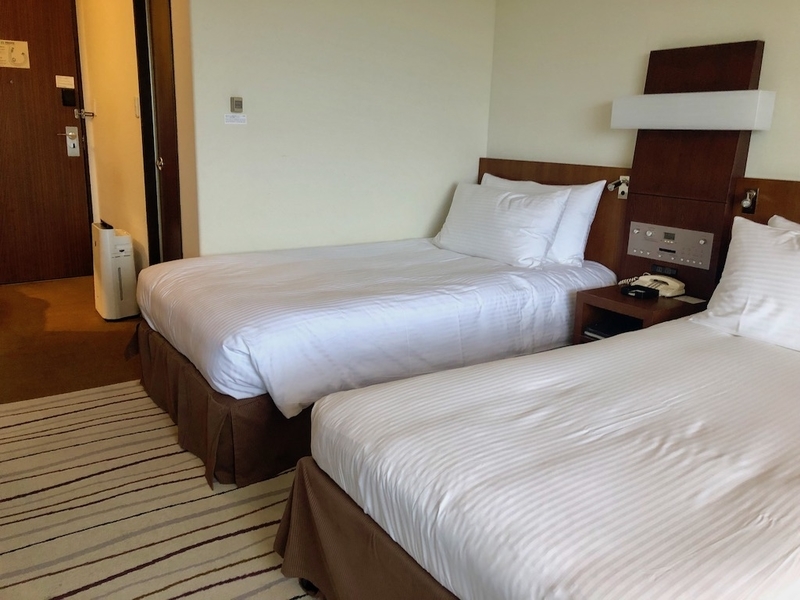
You have chosen Hilton Niseko Village; the remaining decision is the room contract. This guide does not rank Hilton against another hotel. It shows how to reduce a list containing labels such as Deluxe Yotei View and Panorama Deluxe to one room whose written view, bed, occupancy, meals, payment terms and cancellation conditions match the trip you are actually booking. Room names visible on a property page can change with dates, party details, language and inventory, so every label here is a field to verify rather than a promise of availability. Advertisement / affiliate disclosure — this article links to the exact Trip.com page for Hilton Niseko Village, property ID 1483142. If you complete an eligible booking through it, this site may receive a commission. The author stayed at this hotel on a separate past trip, but that stay does not establish your current room, view, price, meals, deposit, availability or cancellation terms. Use the complete selected rate and booking confirmation as the decision records.
Check the exact booking optionUse the record only to identify the author's relationship to the property. The current room and rate must be rebuilt from the exact official inventory, Trip.com selection, checkout and confirmation.
The author stayed in a 16th-floor twin room on a separate past trip. That record proves only the documented stay and its own observations; it does not establish a current Yotei or Panorama room, view, floor, meal, price, availability, deposit, cancellation term or Trip.com order.
This guide contains clearly marked affiliate links. If you complete an eligible booking after following one, this site may earn a commission. Check the final payable amount and conditions on the provider screen. The linked product is not the author’s own stay.
Start only after Hilton has won
This page begins after you have decided to stay at Hilton Niseko Village. If you are still choosing between the two Niseko Village hotels, return to the linked Hilton-versus-Ritz-Carlton Reserve decision first. Keeping the hotel decision in the parent guide prevents a room-name comparison from being mistaken for a fresh hotel ranking.
For the room decision, write down one fixed search: check-in and check-out dates, number of rooms, every guest's actual age, required bed arrangement and display currency. Use that same search throughout this guide. A room shown after changing a date, age or room count belongs to a different comparison and should not be used to explain the original result.
Thirty-second answer: choose the written view, not the photo
If seeing Mount Yotei is essential, keep only a complete room and rate whose written details identify the required view, and check that wording again in the booking confirmation. A room name containing Yotei is a useful starting field, but the safer basis for comparison is the complete description attached to your dates and party, not a label remembered from an earlier search.
Do not use the word Panorama, a hero photograph or the property's shared gallery to infer room direction, floor or the scene from a particular window. If the written room details do not resolve the view you require, pause before payment and obtain clarification from the hotel or provider in a form you can retain.
Advertisement / affiliate link — this opens the exact Trip.com page for Hilton Niseko Village, property ID 1483142. It is not another Hilton, a Niseko hotel list, official direct booking, the author's old stay or proof of a named room, view, floor, price, meal, inventory, deposit or cancellation term.
Enter the real dates, room count and every guest's real age. Match property ID 1483142, Hilton Niseko Village, the complete room and rate, written view, king or twin bed, capacity, room facilities, meals, children, taxes and mandatory charges, checkout total, payment or deposit wording and cancellation deadline. Recheck the same fields in the confirmation. A room is not a lift pass, lesson, rental, airport transfer or local-transport seat.
Lock dates, party and currency before reading labels
Build a booking header before comparing rooms. Record the dates, number of nights, room count, adults, each child's actual age, desired king or twin setup and currency. If meal inclusion matters, add it to the header as a requirement rather than assuming that every result uses the same board basis.
Never alter a child's age to make another room appear, and never compare a result from one set of inputs with a result from another as though they were interchangeable. If you intentionally test a second configuration, save it as a separate scenario with its own total, occupancy and cancellation fields.
Match property ID 1483142 before reading room benefits
The purchase surface used by this guide is the Trip.com page whose URL contains property ID 1483142. Confirm the English property name and location on the opened page before you inspect room benefits. A city search result or another Hilton page is not an adequate substitute for the exact property.
If the link redirects to a different property ID, the displayed hotel name no longer matches or the destination cannot be identified, stop the room comparison. Do not continue by matching a logo, a similar photograph or the word Niseko; room terms only matter after the property itself has been verified.
Build a room-name crosswalk, not a photo match
Create a small crosswalk with one row per candidate. In the left column, copy the official room name and the fields the official page actually states; in the right column, copy the complete Trip.com room and rate label shown for your fixed search. Compare bed type, capacity, stated view, area and room facilities only where both sources provide those fields.
Do not connect two rows merely because they both contain Deluxe, Panorama or Family, and do not use similar images as the missing key. If one provider label could refer to more than one official category, classify the mapping as unresolved. Remove that candidate or ask for written clarification rather than filling gaps with assumptions.
Deluxe Yotei View is a view contract plus a bed contract
Hilton's official material includes a page for a Deluxe Yotei Twin, while the Trip.com surface observed during research contained Deluxe Yotei View labels. For your dates, compare the complete Trip.com label with the current official inventory and identify both the written view and the bed arrangement. A view requirement does not replace a bed requirement, and a twin reference does not establish that a king version has the same terms.
The word Yotei alone does not establish a particular floor, the absence of an obstruction, weather conditions or an upgrade. If one of those points is essential to the trip, look for it in the selected rate or obtain a written answer before paying. Keep any allocation request separate from a room feature that the rate explicitly includes.
Panorama Deluxe must earn the choice with verified fields
Treat Panorama Deluxe as a separate candidate, not as an automatic step above the Yotei-labelled option. Record the complete room name, bed, maximum occupancy, written view, floor information and facilities only when they are present in the current official inventory or the selected Trip.com rate. An empty cell is an unresolved item, not permission to copy a value from another category.
Choose Panorama only if the verified differences solve a need you have stated, such as a particular bed arrangement or a view description written into the rate. The label by itself does not show that the room is wider, higher or more suitable than a Yotei-labelled room. If the distinguishing fields cannot be mapped consistently, there is not enough information to recommend that option.
Advertisement / affiliate link — this opens the exact Trip.com page for Hilton Niseko Village, property ID 1483142. It is not another Hilton, a Niseko hotel list, official direct booking, the author's old stay or proof of a named room, view, floor, price, meal, inventory, deposit or cancellation term.
Enter the real dates, room count and every guest's real age. Match property ID 1483142, Hilton Niseko Village, the complete room and rate, written view, king or twin bed, capacity, room facilities, meals, children, taxes and mandatory charges, checkout total, payment or deposit wording and cancellation deadline. Recheck the same fields in the confirmation. A room is not a lift pass, lesson, rental, airport transfer or local-transport seat.
King, twin and family labels solve different problems
Read the bed and family fields independently from the view. For every complete room and rate, verify king or twin, any rollaway or crib wording, the maximum occupancy, the permitted child ages and the number of guests covered by meals. A room can carry the desired view label and still fail the group's sleeping or age requirements.
A Family label does not by itself include an extra bed, a child's breakfast or connecting rooms. Before payment, account for where every person will sleep and which meals are included for each guest. If those details are not explicit, obtain clarification instead of treating the maximum-person figure as a list of included benefits.
Public onsen is not an in-room bath entitlement
Keep the hotel's shared bathing facilities and the selected guest room's bathroom in separate rows. Recheck current operating hours, age conditions, maintenance closures and any access rules close to the stay through an official source. Those property-level details can change independently from the room reservation.
The presence of a public onsen does not turn a guest room into an in-room onsen, private bath or open-air-bath room. If the complete room description does not state a private bathing feature, mark it as unconfirmed rather than either included or absent. Readers who require that feature should not rely on property imagery or another guest's room.
Breakfast, deposit, payment and cancellation belong to the rate
Room category and rate conditions are different layers of the purchase. From the selected rate, record the number of breakfasts, any child-meal wording, when payment is taken, whether a deposit or preauthorisation is described, any amount payable at the property and the exact cancellation deadline with its time zone. Repeat the check at checkout.
A hotel restaurant page or the author's earlier stay does not show that breakfast is included in the rate now on screen. If checkout changes a meal, payment or cancellation condition, stop and resolve the difference before payment. Save the confirmation after booking and verify that its fields match the option you intended to purchase.
Compare the same-date total, then separate ski and transport
Compare Yotei-labelled and Panorama-labelled candidates only after both use the same dates, party, meal basis and cancellation basis. Build the payable accommodation total from the amount shown at checkout, mandatory tax or service-charge entries and any amount identified for collection at the property. Do not copy a fixed price into this guide because the relevant number is the total for the reader's live search.
Keep lift passes, lessons, equipment, airport transfers and local transport outside that accommodation total unless the selected rate expressly includes an item. Use the linked Niseko trip-cost guide to assemble those separate contracts. A hotel booking does not by itself confirm lift operation, a transfer seat or a particular arrival route.
What the author's Hilton stay can and cannot prove
The author previously stayed in a twin room at Hilton Niseko Village. That separate past stay establishes only that specific first-person fact and any observations explicitly documented in the owned stay record. It is useful as provenance for the author's relationship to the property, not as a substitute for the reader's current booking documents.
The past stay does not establish today's Trip.com inventory or price, the room assigned for the reader's dates, a Yotei or Panorama allocation, floor, view, meals, deposit, cancellation conditions, transport or current service. Any owned photograph is captioned as a scene from the author's past Hilton stay and is not presented as the reader's selected room or current listing.
Final checkout gate: keep one written room
Before payment, read one candidate from top to bottom: property ID 1483142, full room name, written view, bed, maximum occupancy, every guest's actual age, included meals, taxes and charges, full total, payment or deposit wording and cancellation deadline. Check the same fields in the final checkout screen, then check them again in the booking confirmation.
If a trip-critical field remains unresolved, pause rather than completing the purchase. When every trip-critical field can be verified consistently, keep only that one room record and discard duplicate comparison tabs so a later change is less likely to be made against the wrong rate. For broader accommodation context after this room decision, return through the linked Niseko hotels hub.
Official information to reopen before payment
Operations, access and room inventory can change. These links verify current facts; the author’s original records remain limited to the clearly labelled kitalog.net visits above.
- Trip.com — Hilton Niseko Village property 1483142 ↗
- Hilton Niseko Village — official Deluxe Yotei Twin room ↗
- Hilton — official Hilton Niseko Village overview ↗
- kitalog.net — author's separate past Hilton Niseko Village stay ↗
- IKYU — Hilton Niseko Village reviews used only to identify reader questions ↗
Hotel comparison FAQ
Does a Deluxe Yotei View room name alone confirm the full Mount Yotei view I expect?
No. Use the complete selected rate and booking confirmation to verify the written view, and ask for clarification if floor or obstruction is essential. The room name alone does not establish weather, floor or every aspect of the scene from the window.
Is Panorama Deluxe automatically the stronger view choice?
No. Compare only the fields that can be mapped between the current official inventory and the complete rate for your dates. If Panorama cannot be connected to a specific written view and room contract, the name is not enough to rank it above a Yotei-labelled option.
Can I choose king or twin after booking?
Treat king or twin as confirmed only when the booked room or confirmation states it as a confirmed bed type. A preference or request can have a different status. If the bed arrangement is essential and the wording is unclear, obtain written clarification before payment.
Does the Hilton room include breakfast and onsen access?
Check them separately. Breakfast belongs to the selected rate, including the guests and ages covered. Shared-facility access and its current operating conditions belong to the hotel's current official information. A property overview does not prove that a particular room rate includes both.
Has the author stayed at Hilton Niseko Village?
Yes. The author stayed in a twin room on a separate past trip. That fact does not establish the current room, view, price, inventory, meals, deposit, cancellation terms or service for another guest's dates.
Recheck room inventory, taxes, dining, transport and cancellation with the provider before payment and departure.